> ## Documentation Index
> Fetch the complete documentation index at: https://infisical-groups-phase-3.mintlify.site/llms.txt
> Use this file to discover all available pages before exploring further.
# Kubernetes
> How to use Infisical to inject secrets into Kubernetes clusters.
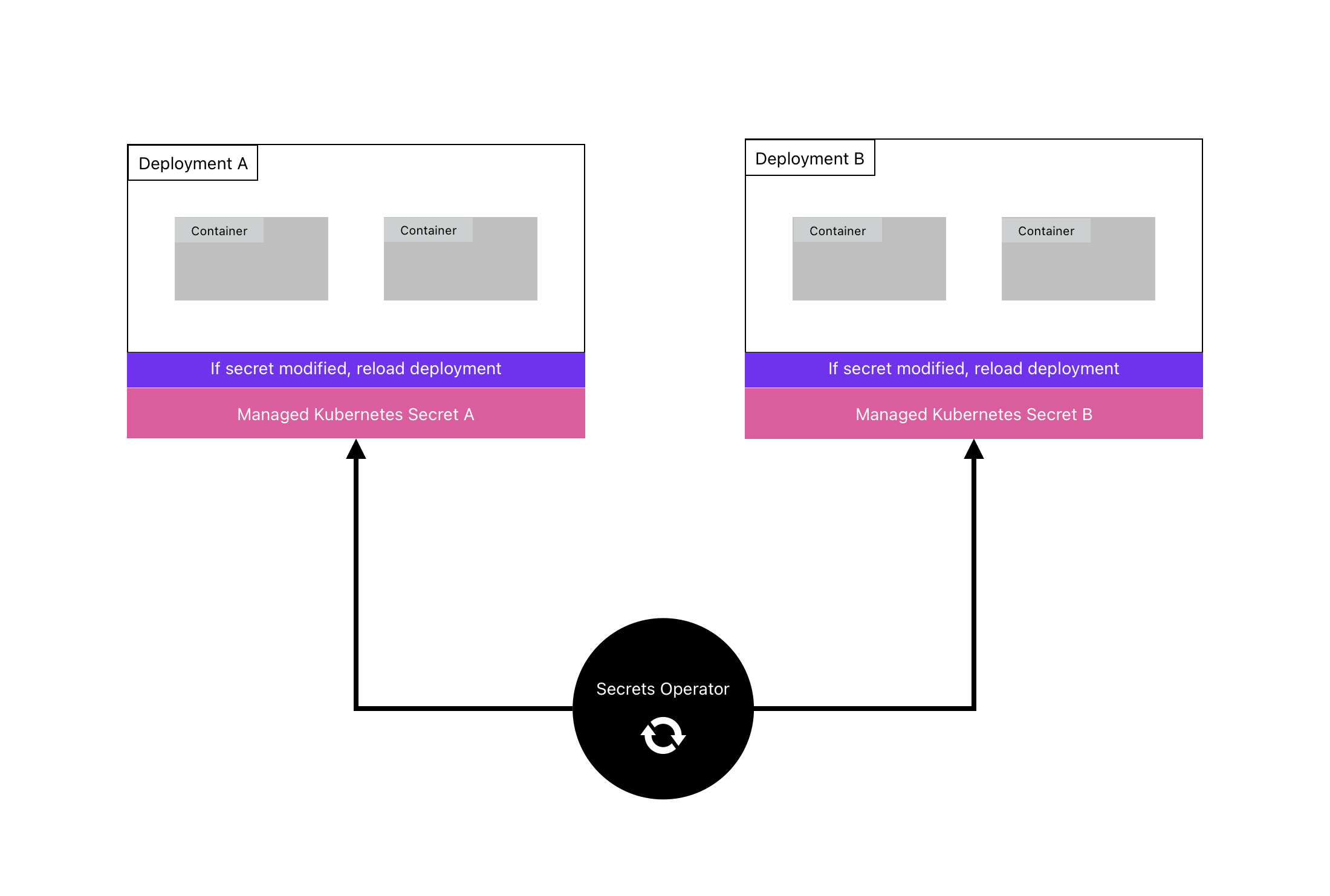
The Infisical Secrets Operator is a Kubernetes controller that retrieves secrets from Infisical and stores them in a designated cluster.
It uses an `InfisicalSecret` resource to specify authentication and storage methods.
The operator continuously updates secrets and can also reload dependent deployments automatically.
## Install Operator
The operator can be install via [Helm](https://helm.sh) or [kubectl](https://github.com/kubernetes/kubectl)
**Install the latest Infisical Helm repository**
```bash
helm repo add infisical-helm-charts 'https://dl.cloudsmith.io/public/infisical/helm-charts/helm/charts/'
helm repo update
```
**Install the Helm chart**
For production deployments, it is highly recommended to set the chart version and the application version during installs and upgrades.
This will prevent the operator from being accidentally updated to the latest version and introduce unintended breaking changes.
View application versions [here](https://hub.docker.com/r/infisical/kubernetes-operator/tags) and chart versions [here](https://cloudsmith.io/~infisical/repos/helm-charts/packages/detail/helm/secrets-operator/#versions)
```bash
helm install --generate-name infisical-helm-charts/secrets-operator --version= --set controllerManager.manager.image.tag=
# Example installing app version v0.2.0 and chart version 0.1.4
helm install --generate-name infisical-helm-charts/secrets-operator --version=0.1.4 --set controllerManager.manager.image.tag=v0.2.0
```
For production deployments, it is highly recommended to set the version of the Kubernetes operator manually instead of pointing to the latest version.
Doing so will help you avoid accidental updates to the newest release which may introduce unintended breaking changes. View all application versions [here](https://hub.docker.com/r/infisical/kubernetes-operator/tags).
The command below will install the most recent version of the Kubernetes operator.
However, to set the version manually, download the manifest and set the image tag version of `infisical/kubernetes-operator` according to your desired version.
Once you apply the manifest, the operator will be installed in `infisical-operator-system` namespace.
```
kubectl apply -f https://raw.githubusercontent.com/Infisical/infisical/main/k8-operator/kubectl-install/install-secrets-operator.yaml
```
## Sync Infisical Secrets to your cluster
Once you have installed the operator to your cluster, you'll need to create a `InfisicalSecret` custom resource definition (CRD).
```yaml example-infisical-secret-crd.yaml
apiVersion: secrets.infisical.com/v1alpha1
kind: InfisicalSecret
metadata:
name: infisicalsecret-sample
labels:
label-to-be-passed-to-managed-secret: sample-value
annotations:
example.com/annotation-to-be-passed-to-managed-secret: "sample-value"
spec:
hostAPI: https://app.infisical.com/api
resyncInterval: 10
authentication:
# Make sure to only have 1 authentication method defined, serviceToken/universalAuth.
# If you have multiple authentication methods defined, it may cause issues.
universalAuth:
secretsScope:
projectSlug:
envSlug: # "dev", "staging", "prod", etc..
secretsPath: "" # Root is "/"
credentialsRef:
secretName: universal-auth-credentials
secretNamespace: default
serviceToken:
serviceTokenSecretReference:
secretName: service-token
secretNamespace: default
secretsScope:
envSlug:
secretsPath: # Root is "/"
managedSecretReference:
secretName: managed-secret
secretNamespace: default
creationPolicy: "Orphan" ## Owner | Orphan (default)
# secretType: kubernetes.io/dockerconfigjson
```
### InfisicalSecret CRD properties
If you are fetching secrets from a self hosted instance of Infisical set the value of `hostAPI` to
` https://your-self-hosted-instace.com/api`
When `hostAPI` is not defined the operator fetches secrets from Infisical Cloud.
If you have installed your Infisical instance within the same cluster as the Infisical operator, you can optionally access the Infisical backend's service directly without having to route through the public internet.
To achieve this, use the following address for the hostAPI field:
```bash
http://..svc.cluster.local:4000/api
```
Make sure to replace `` and `` with the appropriate values for your backend service and namespace.
This property defines the time in seconds between each secret re-sync from Infisical. Shorter time between re-syncs will require higher rate limits only available on paid plans.
Default re-sync interval is every 1 minute.
This block defines the method that will be used to authenticate with Infisical so that secrets can be fetched
The universal machine identity authentication method is used to authenticate with Infisical. The client ID and client secret needs to be stored in a Kubernetes secret. This block defines the reference to the name and namespace of secret that stores these credentials.
You need to create a machine identity, and give it access to the project(s) you want to interact with. You can [read more about machine identities here](/documentation/platform/identities/universal-auth).
Once you have created your machine identity and added it to your project(s), you will need to create a Kubernetes secret containing the identity credentials.
To quickly create a Kubernetes secret containing the identity credentials, you can run the command below.
Make sure you replace `` with the identity client ID and `` with the identity client secret.
```bash
kubectl create secret generic universal-auth-credentials --from-literal=clientId="" --from-literal=clientSecret=""
```
Once the secret is created, add the `secretName` and `secretNamespace` of the secret that was just created under `authentication.universalAuth.credentialsRef` field in the InfisicalSecret resource.
Make sure to also populate the `secretsScope` field with the project slug *`projectSlug`*, environment slug *`envSlug`*, and secrets path *`secretsPath`* that you want to fetch secrets from. Please see the example below.
## Example
```yaml
apiVersion: secrets.infisical.com/v1alpha1
kind: InfisicalSecret
metadata:
name: infisicalsecret-sample-crd
spec:
authentication:
universalAuth:
secretsScope:
projectSlug: # <-- project slug
envSlug: # "dev", "staging", "prod", etc..
secretsPath: "" # Root is "/"
credentialsRef:
secretName: universal-auth-credentials # <-- name of the Kubernetes secret that stores our machine identity credentials
secretNamespace: default # <-- namespace of the Kubernetes secret that stores our machine identity credentials
...
```
The service token required to authenticate with Infisical needs to be stored in a Kubernetes secret. This block defines the reference to the name and namespace of secret that stores this service token.
Follow the instructions below to create and store the service token in a Kubernetes secrets and reference it in your CRD.
#### 1. Generate service token
You can generate a [service token](../../documentation/platform/token) for an Infisical project by heading over to the Infisical dashboard then to Project Settings.
#### 2. Create Kubernetes secret containing service token
Once you have generated the service token, you will need to create a Kubernetes secret containing the service token you generated.
To quickly create a Kubernetes secret containing the generated service token, you can run the command below. Make sure you replace `` with your service token.
```bash
kubectl create secret generic service-token --from-literal=infisicalToken=""
```
#### 3. Add reference for the Kubernetes secret containing service token
Once the secret is created, add the name and namespace of the secret that was just created under `authentication.serviceToken.serviceTokenSecretReference` field in the InfisicalSecret resource.
Make sure to also populate the `secretsScope` field with the, environment slug *`envSlug`*, and secrets path *`secretsPath`* that you want to fetch secrets from. Please see the example below.
## Example
```yaml
apiVersion: secrets.infisical.com/v1alpha1
kind: InfisicalSecret
metadata:
name: infisicalsecret-sample-crd
spec:
authentication:
serviceToken:
serviceTokenSecretReference:
secretName: service-token # <-- name of the Kubernetes secret that stores our service token
secretNamespace: option # <-- namespace of the Kubernetes secret that stores our service token
secretsScope:
envSlug: # "dev", "staging", "prod", etc..
secretsPath: # Root is "/"
...
```
The `managedSecretReference` field is used to define the target location for storing secrets retrieved from an Infisical project.
This field requires specifying both the name and namespace of the Kubernetes secret that will hold these secrets.
The Infisical operator will automatically create the Kubernetes secret with the specified name/namespace and keep it continuously updated.
Note: The managed secret be should be created in the same namespace as the deployment that will use it.
The name of the managed Kubernetes secret to be created
The namespace of the managed Kubernetes secret to be created.
Override the default Opaque type for managed secrets with this field. Useful for creating kubernetes.io/dockerconfigjson secrets.
Creation polices allow you to control whether or not owner references should be added to the managed Kubernetes secret that is generated by the Infisical operator.
This is useful for tools such as ArgoCD, where every resource requires an owner reference; otherwise, it will be pruned automatically.
#### Available options
* `Orphan` (default)
* `Owner`
When creation policy is set to `Owner`, the `InfisicalSecret` CRD must be in the same namespace as where the managed kubernetes secret.
### Propagating labels & annotations
The operator will transfer all labels & annotations present on the `InfisicalSecret` CRD to the managed Kubernetes secret to be created.
Thus, if a specific label is required on the resulting secret, it can be applied as demonstrated in the following example:
```yaml
apiVersion: secrets.infisical.com/v1alpha1
kind: InfisicalSecret
metadata:
name: infisicalsecret-sample
labels:
label-to-be-passed-to-managed-secret: sample-value
annotations:
example.com/annotation-to-be-passed-to-managed-secret: "sample-value"
spec:
..
authentication:
...
managedSecretReference:
...
```
This would result in the following managed secret to be created:
```yaml
apiVersion: v1
data:
...
kind: Secret
metadata:
annotations:
example.com/annotation-to-be-passed-to-managed-secret: sample-value
secrets.infisical.com/version: W/"3f1-ZyOSsrCLGSkAhhCkY2USPu2ivRw"
labels:
label-to-be-passed-to-managed-secret: sample-value
name: managed-token
namespace: default
type: Opaque
```
### Apply the Infisical CRD to your cluster
Once you have configured the Infisical CRD with the required fields, you can apply it to your cluster.
After applying, you should notice that the managed secret has been created in the desired namespace your specified.
```
kubectl apply -f example-infisical-secret-crd.yaml
```
### Verify managed secret creation
To verify that the operator has successfully created the managed secret, you can check the secrets in the namespace that was specified.
```bash
# Verify managed secret is created
kubectl get secrets -n
```
The Infisical secrets will be synced and stored into the managed secret every
1 minutes.
### Using managed secret in your deployment
Incorporating the managed secret created by the operator into your deployment can be achieved through several methods.
Here, we will highlight three of the most common ways to utilize it. Learn more about Kubernetes secrets [here](https://kubernetes.io/docs/concepts/configuration/secret/)
This will take all the secrets from your managed secret and expose them to your container
```yaml
envFrom:
- secretRef:
name: managed-secret # managed secret name
```
Example usage in a deployment
```yaml
apiVersion: apps/v1
kind: Deployment
metadata:
name: nginx-deployment
labels:
app: nginx
spec:
replicas: 1
selector:
matchLabels:
app: nginx
template:
metadata:
labels:
app: nginx
spec:
containers:
- name: nginx
image: nginx:1.14.2
envFrom:
- secretRef:
name: managed-secret # <- name of managed secret
ports:
- containerPort: 80
```
This will allow you to select individual secrets by key name from your managed secret and expose them to your container
```yaml
env:
- name: SECRET_NAME # The environment variable's name which is made available in the container
valueFrom:
secretKeyRef:
name: managed-secret # managed secret name
key: SOME_SECRET_KEY # The name of the key which exists in the managed secret
```
Example usage in a deployment
```yaml
apiVersion: apps/v1
kind: Deployment
metadata:
name: nginx-deployment
labels:
app: nginx
spec:
replicas: 1
selector:
matchLabels:
app: nginx
template:
metadata:
labels:
app: nginx
spec:
containers:
- name: nginx
image: nginx:1.14.2
env:
- name: STRIPE_API_SECRET
valueFrom:
secretKeyRef:
name: managed-secret # <- name of managed secret
key: STRIPE_API_SECRET
ports:
- containerPort: 80
```
This will allow you to create a volume on your container which comprises of files holding the secrets in your managed kubernetes secret
```yaml
volumes:
- name: secrets-volume-name # The name of the volume under which secrets will be stored
secret:
secretName: managed-secret # managed secret name
```
You can then mount this volume to the container's filesystem so that your deployment can access the files containing the managed secrets
```yaml
volumeMounts:
- name: secrets-volume-name
mountPath: /etc/secrets
readOnly: true
```
Example usage in a deployment
```yaml
apiVersion: apps/v1
kind: Deployment
metadata:
name: nginx-deployment
labels:
app: nginx
spec:
replicas: 1
selector:
matchLabels:
app: nginx
template:
metadata:
labels:
app: nginx
spec:
containers:
- name: nginx
image: nginx:1.14.2
volumeMounts:
- name: secrets-volume-name
mountPath: /etc/secrets
readOnly: true
ports:
- containerPort: 80
volumes:
- name: secrets-volume-name
secret:
secretName: managed-secret # <- managed secrets
```
## Auto redeployment
Deployments using managed secrets don't reload automatically on updates, so they may use outdated secrets unless manually redeployed.
To address this, we added functionality to automatically redeploy your deployment when its managed secret updates.
### Enabling auto redeploy
To enable auto redeployment you simply have to add the following annotation to the deployment that consumes a managed secret
```yaml
secrets.infisical.com/auto-reload: "true"
```
```yaml
apiVersion: apps/v1
kind: Deployment
metadata:
name: nginx-deployment
labels:
app: nginx
annotations:
secrets.infisical.com/auto-reload: "true" # <- redeployment annotation
spec:
replicas: 1
selector:
matchLabels:
app: nginx
template:
metadata:
labels:
app: nginx
spec:
containers:
- name: nginx
image: nginx:1.14.2
envFrom:
- secretRef:
name: managed-secret
ports:
- containerPort: 80
```
## Global configuration
To configure global settings that will apply to all instances of `InfisicalSecret`, you can define these configurations in a Kubernetes ConfigMap.
For example, you can configure all `InfisicalSecret` instances to fetch secrets from a single backend API without specifying the `hostAPI` parameter for each instance.
### Available global properties
| Property | Description | Default value |
| -------- | --------------------------------------------------------------------------------- | -------------------------------------------------------------- |
| hostAPI | If `hostAPI` in `InfisicalSecret` instance is left empty, this value will be used | [https://app.infisical.com/api](https://app.infisical.com/api) |
### Applying global configurations
All global configurations must reside in a Kubernetes ConfigMap named `infisical-config` in the namespace `infisical-operator-system`.
To apply global configuration to the operator, copy the following yaml into `infisical-config.yaml` file.
```yaml infisical-config.yaml
apiVersion: v1
kind: Namespace
metadata:
name: infisical-operator-system
---
apiVersion: v1
kind: ConfigMap
metadata:
name: infisical-config
namespace: infisical-operator-system
data:
hostAPI: https://example.com/api # <-- global hostAPI
```
Then apply this change via kubectl by running the following
```bash
kubectl apply -f infisical-config.yaml
```
## Troubleshoot operator
If the operator is unable to fetch secrets from the API, it will not affect the managed Kubernetes secret.
It will continue attempting to reconnect to the API indefinitely.
The InfisicalSecret resource uses the `status.conditions` field to report its current state and any errors encountered.
```yaml
$ kubectl get infisicalSecrets
NAME AGE
infisicalsecret-sample 12s
$ kubectl describe infisicalSecret infisicalsecret-sample
...
Spec:
...
Status:
Conditions:
Last Transition Time: 2022-12-18T04:29:09Z
Message: Infisical controller has located the Infisical token in provided Kubernetes secret
Reason: OK
Status: True
Type: secrets.infisical.com/LoadedInfisicalToken
Last Transition Time: 2022-12-18T04:29:10Z
Message: Failed to update secret because: 400 Bad Request
Reason: Error
Status: False
Type: secrets.infisical.com/ReadyToSyncSecrets
Events:
```
## Uninstall Operator
The managed secret created by the operator will not be deleted when the operator is uninstalled.
Install Infisical Helm repository
```bash
helm uninstall
```
```
kubectl delete -f https://raw.githubusercontent.com/Infisical/infisical/main/k8-operator/kubectl-install/install-secrets-operator.yaml
```
## Useful Articles
* [Managing secrets in OpenShift with Infisical](https://xphyr.net/post/infisical_ocp/)